Streaming
Streaming (live video broadcasting) - real-time video transmission with public or private viewer access.
The output video stream can be delivered to viewers in different protocols and quality levels.
Live transcoding converts the source video into various formats before delivering to viewers.
Stream Object
The system creates a stream object to manage the service. Key parameters:
- Output protocols:
llhls,webrtc - Resolution options (for player quality selection):
480p,720p,1080p,1440p,bypass(no transcoding)
Setup
When configuring, specify desired output parameters: protocols and resolutions.
The system will then generate unique URLs for broadcasters and viewers.
For broadcasters:
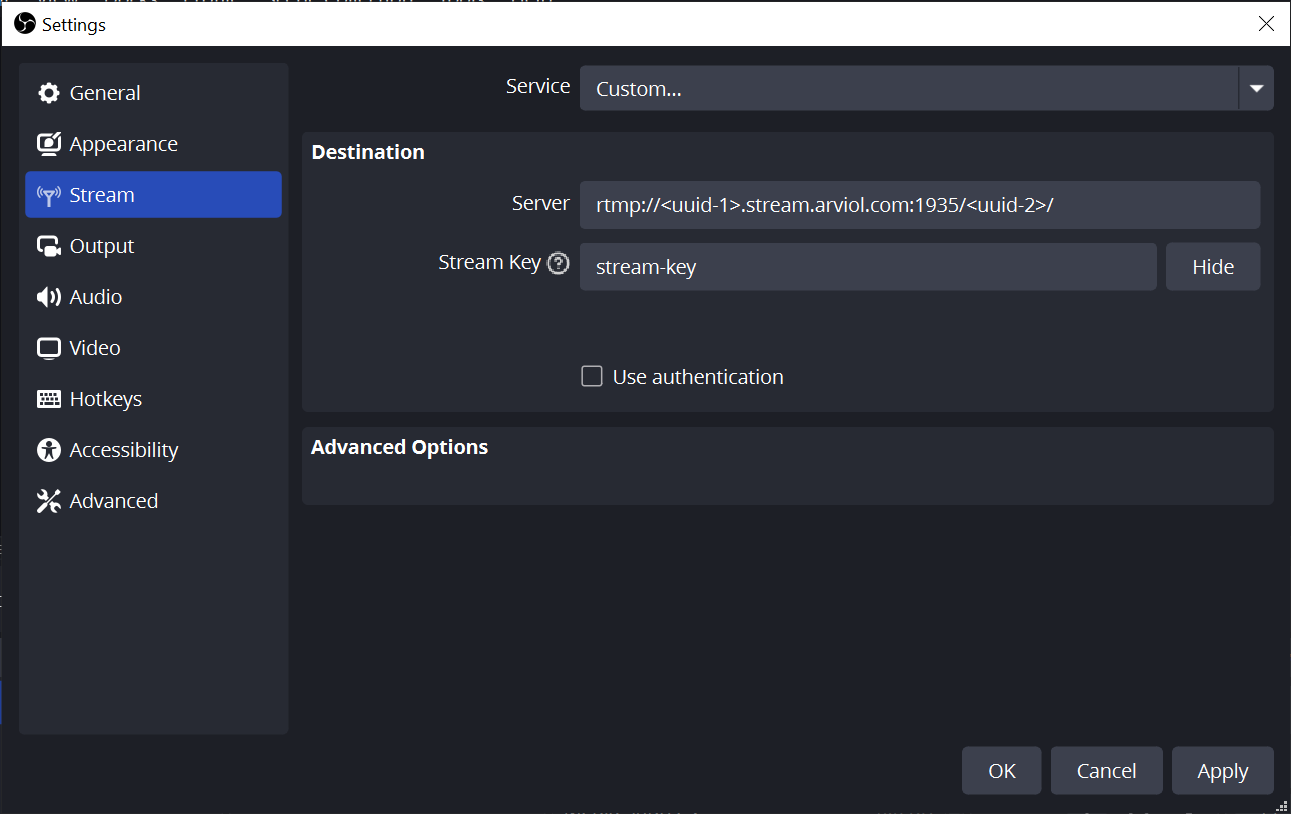
rtmp://<uuid-1>.stream.arviol.com:1935/<uuid-2>/stream-keyrtmps://<uuid-1>.stream.arviol.com:1940/<uuid-2>/stream-key
For viewers:
- llhls -
https://<uuid-1>.play.arviol.com:443/<uuid-2>/stream-key/llhls.m3u8 - webrtc -
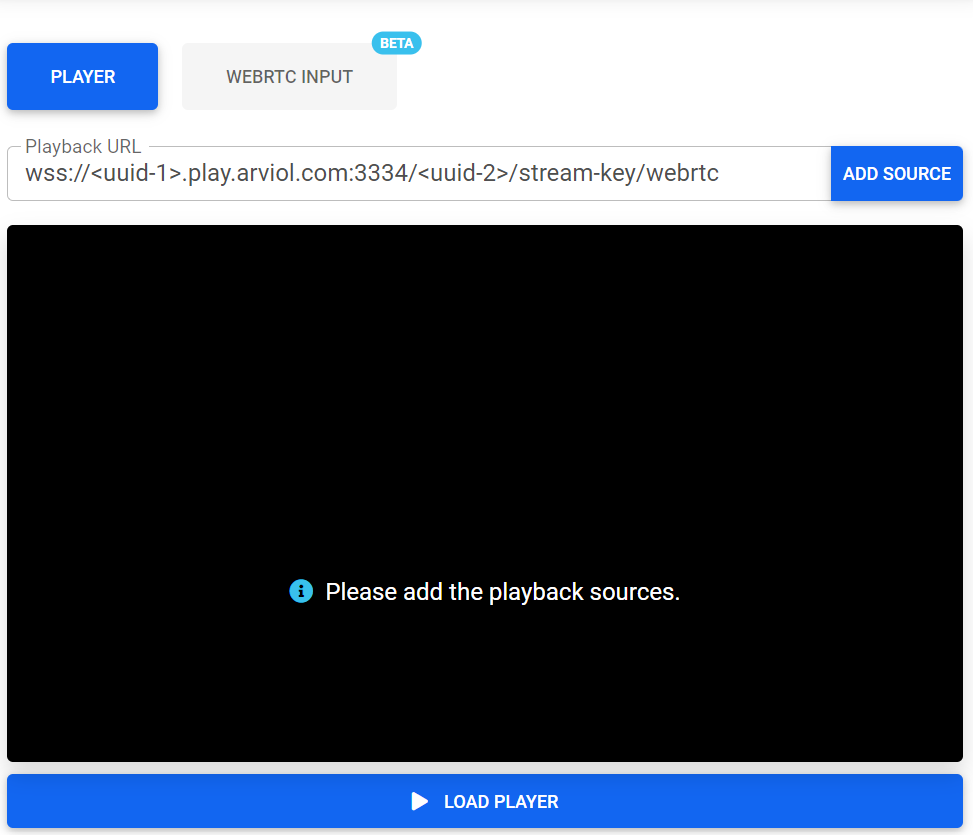
wss://<uuid-1>.play.arviol.com:3334/<uuid-2>/stream-key/webrtc
Publishing Streams
Multiple applications support stream publishing.
We recommend Open Broadcaster Software - a popular free, open-source solution for video recording and live streaming.
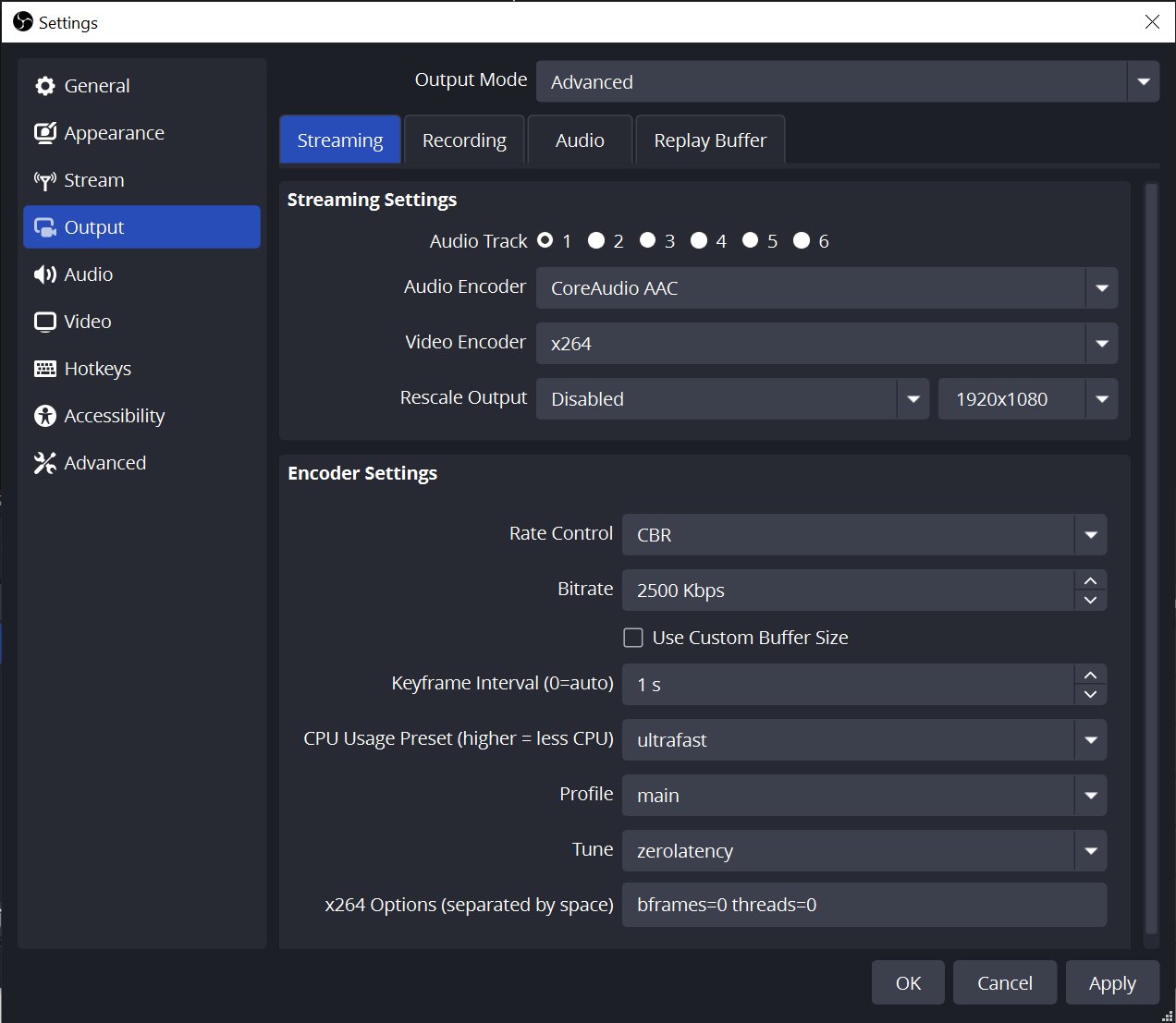
Configure these settings in your streaming application:
Recommended OBS encoder output settings:
Viewing Streams
Use any online player to view streams by entering the viewer URL unchanged.
llhls players:
webrtc players:
Signed URLs
Signed URLs (signed policy) control access for both broadcasters and viewers.
Use cases for signed URLs:
- Restrict publishing/viewing to specific IP addresses
- Set URL expiration to prevent unauthorized distribution
- Schedule URL activation to prevent premature access
- Combine multiple restrictions as needed
Each stream can have custom restriction parameters.
To generate signed URLs, specify the stream and rule set:
url_expire(datetime): URL expiration timeurl_activate(datetime, optional): URL activation timestream_expire(datetime, optional): Stream expiration timeallow_ip(str, optional): Allowed IP range (CIDR notation)
Resulting URLs format:
rtmp://<uuid-1>.stream.arviol.com:1935/<uuid-2>/stream-key?policy=eyJ1xfZX&signature=tBmYnArtmps://<uuid-1>.stream.arviol.com:1940/<uuid-2>/stream-key?policy=eyJ1xfZX&signature=fod0iBhttps://<uuid-1>.play.arviol.com:443/<uuid-2>/stream-key/llhls.m3u8?policy=eyJxfZXhJ&signature=NALnlHMqywss://<uuid-1>.play.arviol.com:3334/<uuid-2>/stream-key/webrtc?policy=eyJ1c1MH0&signature=wMMPy-LBFal2E
Restreaming
Restreaming (push publishing) forwards incoming streams to third-party platforms like Twitch, YouTube, VKVideo, etc.
Enabling/disabling restreaming creates/removes push_publisher objects.
When active, streams sent to Arviol servers automatically forward to specified external services. Viewers can access content through both the original stream URL and platforms like Twitch.
Multiple restreams can run simultaneously for a single stream object.
Stopping the source stream doesn't delete push_publisher objects. Restarting the main stream automatically resumes restreaming with previous settings.
Stream Recording
When stream recording is enabled, video is saved in original quality as 1-minute fragments and uploaded to file storage. Videos are available for download for 1 month after upload. All recordings are private - only the stream owner can get access links.
There is a delay when uploading recordings to file storage.
Stream recording can be enabled or disabled at any time.